
Article code: PSHDB13
Tags: Set Up, Line, Efficiency
Answer
When creating a line in Production Scheduling, you will also need to set up the line efficiency.
To set up the line efficiency, fill in the field called “Efficiency” on the "Manage lines" page. See Fig. 1 below. Please refer to your facility’s historical data when entering a line efficiency. If this data is not readily available, please read the section below which will provide you with information and tips on how to set this value.
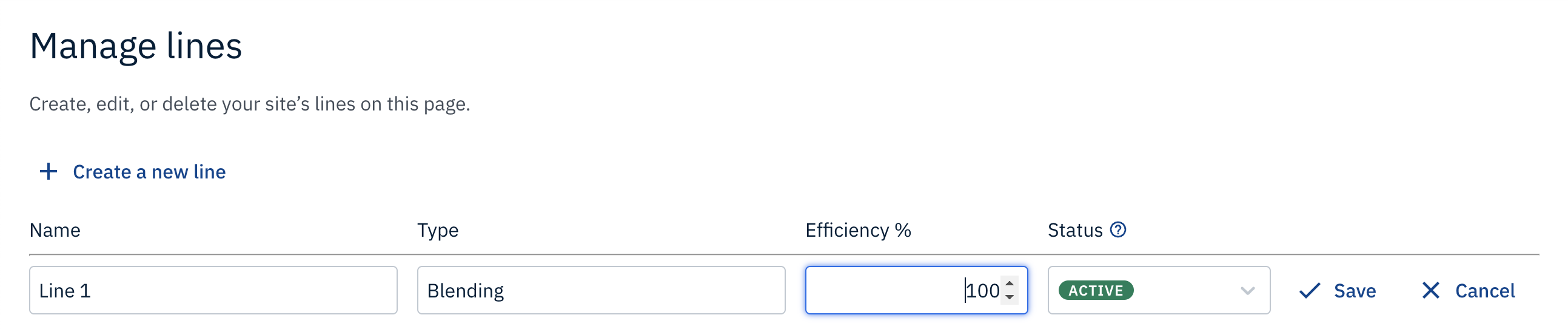
Fig. 1: Screenshot of the Efficiency field on the Manage lines page
A few considerations to keep in mind when setting up line efficiency:
- Efficiency is set to 100% by default
- Efficiency must be greater than zero
- Efficiency cannot be a negative value
By default, line efficiency is set to 100% because it is assumed that lines have the ability to run production at the item’s standard rate of production at all times. For example, the standard rate of production of chocolates (i.e. an item that you produce at your facility) is 10 units of chocolate per hour. Having 100% line efficiency means that workers or machines, scheduled to work on a line, are able to consistently produce 10 units of chocolate per hour, throughout the entire work shift.
Please note that when you update a line's efficiency, it will not change work orders that have been previously scheduled. Changing a line’s efficiency will be applied to current work orders that you are scheduling production for.
Best Practice Tip!
It is more realistic to set line efficiency by taking into account interruptions that occur during production, such as having to pause production in order to resolve an accident on the production line. Thus, it is more practical to set line efficiency to 90%.
Another consideration when setting up line efficiency could be accounting for old machinery used during production. It might be realistic to set a lower line efficiency when your facility is operating with old machinery to account for unplanned downtime like repairing machines.
As you gain a better understanding of the efficiency of each line, it is best to continue to update this value so that your planning activities utilize accurate information!
Related HelpDesk Articles:
Comments
0 comments
Please sign in to leave a comment.