
Article code: PSHDC12
Tags: Work Order Quantity, Troubleshooting
Answer
When you see the “Work order quantity” warning on a work order card, it means that the expected production quantity has not been specified on the work order. See image below.
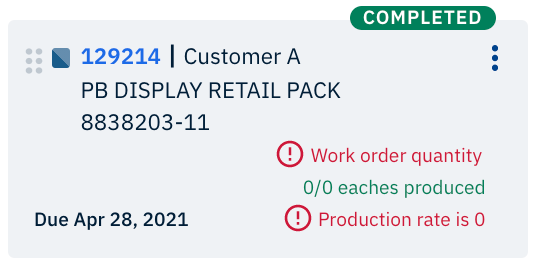
Fig. 1: Example of a work order where the expected production quantity has not been specified
When you see this warning on a work order, you will not be able to schedule the work order because there isn’t any quantity of goods to schedule production for. To resolve this issue, you will need to update the expected production quantity on the work order by importing a CSV file.
It is understandable that sometimes work orders are created before the production quantity is known. If you do know the quantity of expected production for each work, then please enter the amount in the “Units Expected” column in the work order CSV file. Then, follow the import process:
- Click Import in the navigation bar
- Select Work Orders
- Click Choose File in the pop-up window
- Locate the CSV file that contains your item data
- Click Import
When you refresh Production Scheduling, the “Work order quantity” warning should be removed from the work order card and then you will be able to schedule the work order!
Related HelpDesk Articles:
- What does it mean when a work order is completed in Production Scheduling?
- What does "Production rate is 0" mean in Production Scheduling?
- What are the different scheduling statuses in Production Scheduling?
- How do I show work orders that have scheduled production in Production Scheduling?
- How do I use the search filter in the work orders list?
Comments
0 comments
Please sign in to leave a comment.